
Top Contract Drafting Tools of 2026
Table of Contents
- Introduction
- What Makes Contract Drafting Software Essential in 2026
- 1. Spellbook: AI Contract Drafting Software Built for Legal
- 2. Clio Draft: California and Federal Forms with Built-In eSignature
- 3. HotDocs: Enterprise-Grade Contract Drafting Software Since the 1990s
- 4. Gavel: No-Code Rules-Based Automation with Predictable Output
- 5. Lawyaw: Nationwide Court Form Automation
- 6. Legito: Enterprise Document Lifecycle Management
- 7. Precisely ContractExpress: Thomson Reuters Heritage for Enterprise Needs
- 8. Ironclad: Full CLM with Drafting Capabilities
- 9. Juro: Browser-Based Contract Drafting and Management
- 10. ContractPodAi: AI-Powered Enterprise CLM
- 11. DraftWise: AI Assistant for Contract Review and Drafting
- 12. LawGeex: AI Contract Review Focused on Pre-Approval
- Comparing Pure Drafting Tools vs Full CLM Systems
- Selecting the Right Legal Drafting Software for Your Practice
- Bottom Line
- Introduction
- What Makes Contract Drafting Software Essential in 2026
- 1. Spellbook: AI Contract Drafting Software Built for Legal
- 2. Clio Draft: California and Federal Forms with Built-In eSignature
- 3. HotDocs: Enterprise-Grade Contract Drafting Software Since the 1990s
- 4. Gavel: No-Code Rules-Based Automation with Predictable Output
- 5. Lawyaw: Nationwide Court Form Automation
- 6. Legito: Enterprise Document Lifecycle Management
- 7. Precisely ContractExpress: Thomson Reuters Heritage for Enterprise Needs
- 8. Ironclad: Full CLM with Drafting Capabilities
- 9. Juro: Browser-Based Contract Drafting and Management
- 10. ContractPodAi: AI-Powered Enterprise CLM
- 11. DraftWise: AI Assistant for Contract Review and Drafting
- 12. LawGeex: AI Contract Review Focused on Pre-Approval
- Comparing Pure Drafting Tools vs Full CLM Systems
- Selecting the Right Legal Drafting Software for Your Practice
- Bottom Line
Introduction
Contract drafting remains a time-consuming task in legal practice. Manual drafting can lead to inconsistencies, version control issues, and increased billable hours, which clients increasingly question. The right software can change this. Modern tools combine template automation with AI-powered clause suggestions, reducing drafting time by 60-80% while improving consistency and minimizing errors. This guide examines the 12 best contract drafting tools available in 2026, from AI assistants to no-code platforms and enterprise document management systems. We’ll cover technical differentiators, capabilities, and which tools fit specific firm sizes and practice areas.
What Makes Contract Drafting Software Essential in 2026
Contract Drafting Software Categories:
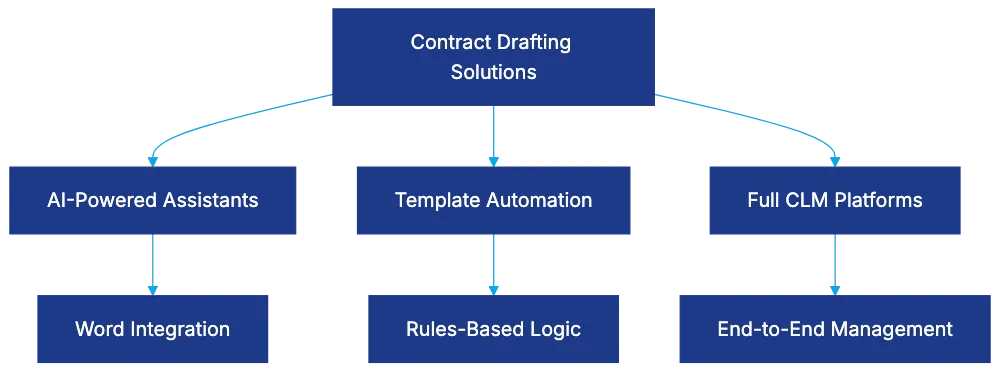
Legal professionals face pressure to reduce costs while maintaining quality. Traditional drafting involves copying from previous documents and cross-checking clauses against standards, introducing errors and wasting time. Contract automation addresses these problems through template libraries, automated clause insertion, and suggestion engines. Modern tools integrate with existing workflows, with Microsoft Word integration being crucial as lawyers already work in Word.
The distinction between pure drafting tools and full contract lifecycle management (CLM) platforms matters for purchasing decisions. CLM systems like Ironclad and Juro include drafting capabilities alongside negotiation, approval workflows, and management. Pure drafting tools focus on document creation, offering template management and clause libraries at lower prices. Firms with mature contract processes may need full CLM, while those focused on drafting should consider specialized tools.
1. Spellbook: AI Contract Drafting Software Built for Legal
Spellbook represents the state of AI contract drafting software for legal work. Unlike general-purpose AI tools, it is trained on billions of legal texts, creating an AI that understands legal drafting conventions, clause structures, and context-appropriate language.
The Microsoft Word integration places AI suggestions in the drafting environment. It analyzes draft language and suggests improvements. For example, Spellbook might flag missing arbitration language or suggest jurisdiction-specific provisions.
Spellbook works best for firms that draft in Microsoft Word, seeking AI assistance without changing workflows. It fits transactional practices and groups drafting complex agreements requiring subtle language.
2. Clio Draft: California and Federal Forms with Built-In eSignature
Clio Draft focuses on California Judicial Council and federal immigration forms, maintaining over 10,000 forms. The built-in eSignature functionality eliminates the need for separate signing tools. Documents move from drafting to execution within a single platform, reducing software costs and simplifying workflows. Integration with Clio connects drafting with practice management.
Clio Draft fits California-based firms, immigration practices, and any Clio user wanting drafting capabilities. The form libraries benefit practitioners in those jurisdictions, while eSignature integration appeals to firms consolidating technology.
3. HotDocs: Enterprise-Grade Contract Drafting Software Since the 1990s
HotDocs, an enterprise approach to legal drafting, handles template logic, calculations, and conditional rules that other systems struggle with. The platform supports complex mathematical calculations and multi-document assembly from single inputs.
The Microsoft Word plugin keeps templates in Word documents enhanced with HotDocs scripting. Building complex templates demands technical skills, creating a learning curve. The investment pays off for organizations drafting high volumes of complex documents.
HotDocs targets medium-to-large law firms, financial institutions, and government agencies with substantial document automation needs.
4. Gavel: No-Code Rules-Based Automation with Predictable Output
Gavel offers a deterministic approach appealing to firms concerned about AI unpredictability. The platform uses rules-based logic for consistent, predictable output. No-code template building lowers the technical barrier.
Gavel excels at client-facing intake forms, shifting data collection to automated intake. This frees lawyers for review work. The tool fits firms serving clients with standardized needs and sufficient variation to require logic.
5. Lawyaw: Nationwide Court Form Automation
Lawyaw specializes in court form automation across all 50 states, maintaining updated state-specific forms. Its acquisition by Clio improved integration while retaining form capabilities.
Lawyaw aids multi-state practices, providing automation without separate systems for different states. Personal injury and family law practices benefit from state-specific form libraries reflecting local preferences.
6. Legito: Enterprise Document Lifecycle Management
Legito spans template creation, clause libraries, collaborative editing, version control, approval workflows, and redlining in a unified environment. Organizations like PwC demonstrate Legito’s enterprise credentials.
Legito targets corporate legal departments and enterprises with substantial document needs. It suits larger organizations with complex processes rather than small firms.
7. Precisely ContractExpress: Thomson Reuters Heritage for Enterprise Needs
Precisely ContractExpress leverages Thomson Reuters for enterprise template management and integration with corporate systems. It supports both on-premises and cloud deployment, appealing to organizations with specific data residency or security policies.
ContractExpress fits large law firms and regulated industries requiring enterprise-grade features.
8. Ironclad: Full CLM with Drafting Capabilities
Ironclad positions as a complete contracting solution, integrating drafting with negotiation tracking, approval workflows, obligation management, and renewal alerting. Its AI capabilities include clause extraction, risk assessment, and suggested language.
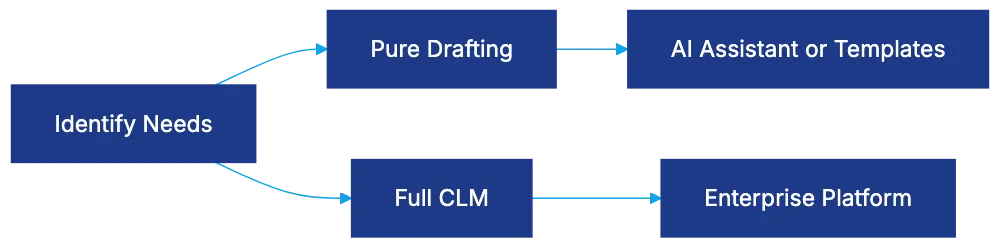
Contract Drafting Tool Decision Framework:
Ironclad targets in-house legal teams and corporate legal departments managing high contract volumes.
9. Juro: Browser-Based Contract Drafting and Management
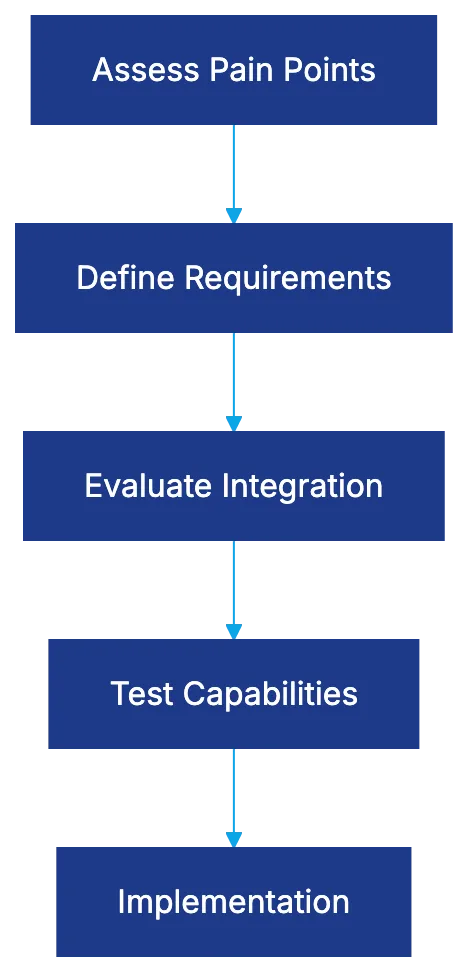
Software Selection Process:
 Juro offers browser-based drafting and management, requiring no integration with Word. It provides collaborative editing, version control, and integration with tools like Slack and Salesforce.
Juro suits technology companies and startups preferring web applications.
10. ContractPodAi: AI-Powered Enterprise CLM
ContractPodAi combines CLM with AI drafting for enterprise needs, focusing on intelligence rather than just management. It targets large enterprises and is less suited to small firms.
11. DraftWise: AI Assistant for Contract Review and Drafting
DraftWise analyzes previous work to personalize suggestions. It suits law firms focused on transactional work and corporate legal departments.
12. LawGeex: AI Contract Review Focused on Pre-Approval
LawGeex specializes in reviewing and pre-approving contracts. It handles complex contracts, allowing legal teams to focus on negotiations.
LawGeex fits in-house departments managing high contract volumes.
Comparing Pure Drafting Tools vs Full CLM Systems
Choosing between drafting tools and full CLM platforms depends on needs and process maturity. Pure drafting tools focus on document creation, offering deep functionality for templates. Full CLM platforms provide end-to-end management. Integration quality and template management features vary significantly.
Selecting the Right Legal Drafting Software for Your Practice
Choosing software starts with understanding your pain points. Evaluate tools based on needs, system integration, technical capabilities, and practice area alignment. Budget considerations extend beyond licensing to setup and ongoing support.
Bottom Line
Contract drafting software offers options from AI assistants to complete enterprise platforms. Spellbook brings AI to Word workflows, while HotDocs provides enterprise template logic. Platforms like Ironclad expand to full contract lifecycle management. Select tools based on capabilities matching your needs for better vendor selection and satisfaction.
Frequently Asked Questions
What factors should I consider when selecting a contract drafting tool?
When choosing a contract drafting tool, assess your firm's specific pain points, such as time taken for drafting and error rates. Consider technical capabilities, integration with existing systems like Microsoft Word, and the software's alignment with your practice area. Budget for both initial costs and ongoing support to ensure a comprehensive evaluation.
How does contract automation improve drafting efficiency?
Contract automation reduces manual input by offering template libraries and automated clause suggestions, resulting in a significant decrease in drafting time. It minimizes inconsistencies and errors often present in traditional drafting methods, allowing legal professionals to focus on higher-value tasks. This efficiency directly impacts client satisfaction by delivering timely and accurate documentation.
What differentiates pure drafting tools from full CLM platforms?
Pure drafting tools focus exclusively on document creation, offering specialized features for template management and clause libraries. In contrast, full Contract Lifecycle Management (CLM) platforms incorporate various stages of the contract process, such as negotiation and approval workflows, providing a more comprehensive solution. The choice depends on your firm's needs, with tool complexity often reflecting these differences.
Can smaller law firms benefit from enterprise-level contract drafting software?
While enterprise-level software offers robust features for managing high volumes of contracts, small firms may find them overly complex or expensive. However, some enterprise solutions have scaled-down versions that cater to smaller practices, focusing on essential features without unnecessary complexity. It's crucial to evaluate if the software meets your drafting needs without overwhelming your existing workflow.
Is training necessary for using advanced contract drafting software?
Many advanced contract drafting tools, particularly those with complex features like HotDocs, may require training to maximize their potential. The learning curve depends on the software's functionality and the technical skills of the users. Most vendors offer training resources and support to help ease the transition and ensure effective use of the tools.
How do I integrate contract drafting software with my existing legal practice management systems?
Integration capabilities vary by software, so it’s crucial to confirm compatibility with your current legal practice management systems. Many tools offer APIs or direct integrations with popular platforms like Clio or Microsoft Office. Discussing integration during your selection process can help streamline workflows and reduce disruptions.
What role does AI play in modern contract drafting tools?
AI enhances contract drafting tools by providing intelligent clause suggestions, identifying inconsistencies, and automating routine drafting tasks. This leads to improved accuracy and efficiency while allowing lawyers to focus on more complex legal issues. As AI continues to evolve, its capabilities in drafting, reviewing, and managing contracts are expected to expand significantly.
Related Articles

Harvey AI Review: Advanced Legal AI for Law Firms
Explore how Harvey AI transforms legal workflows, offering tailored solutions and superior performance for large law firms.

Understanding E-Discovery Software in 2026
Explore how AI-powered e-discovery software transforms legal document review with efficiency and accuracy.

Review of Spellbook AI for Legal Professionals
Explore how Spellbook AI enhances contract drafting and review for legal professionals with Microsoft Word integration.